Take Control of Your
Digital Classroom
Integrated with all major Student Information Systems including PowerSchool, Google G-Suite, and ClassLink, iboss delivers comprehensive classroom management across Chromebooks, Windows, and macOS with flexible control profiles.
See Classroom Management in Action
Watch how iboss Classroom Management gives teachers complete control over student devices and learning environments.
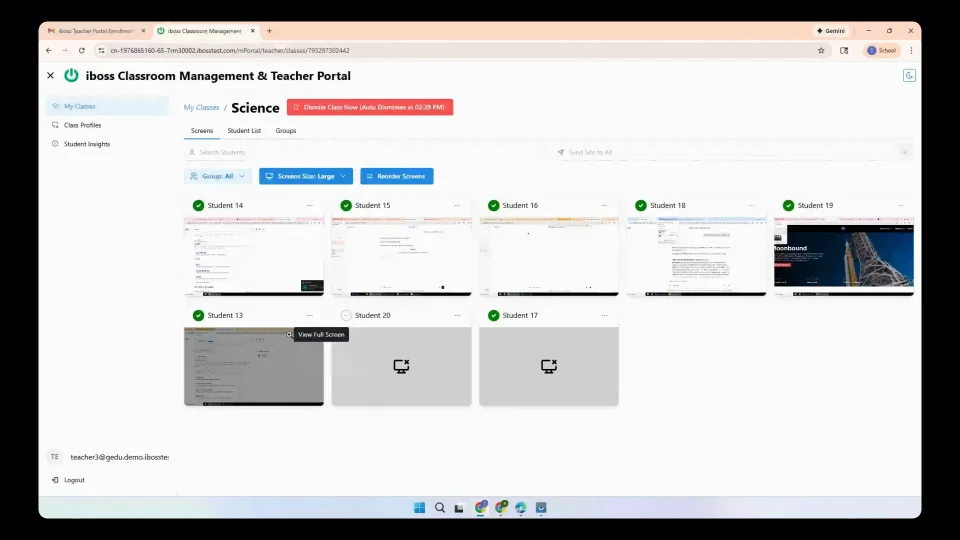
Complete Classroom Management Suite
Everything teachers need to manage digital learning environments effectively while maintaining student engagement and safety.
Visual Student Screen Monitoring
View the screens of all students from a single dashboard with automatically refreshing images to monitor student activities during lectures, exams, or assignments.
- See all student screens from a single page
- Automatically refreshing screen thumbnails
- Monitor activities during any class activity
- Works from any location - classroom or remote teaching
Profile-Based Device Control
Apply comprehensive control profiles to classrooms that manage internet access, application usage, and device behavior based on educational requirements.
- Allowlist profiles for permitted websites and apps
- Blocklist profiles to restrict inappropriate content
- Allow-only mode for specific educational resources
- Focus mode that blocks web browsing completely
Student Information System Integration
Native integration with all major Student Information Systems to synchronize classroom rosters, student data, and management policies seamlessly.
- PowerSchool integration and roster sync
- Google G-Suite for Education support
- ClassLink SSO and management integration
- Automated student enrollment and class assignments
Cross-Device Platform Support
Comprehensive classroom management across Chromebooks, Windows, and macOS devices with unified control and monitoring capabilities.
- Chromebook classroom management and control
- Windows device monitoring and restrictions
- macOS device integration and policies
- Consistent management experience across all platforms
Simple Teacher Workflow
Designed for busy teachers who need powerful controls without complexity. Get up and running in seconds, not minutes.
Select Control Profile
Choose from allowlist, blocklist, allow-only, or focus mode profiles based on lesson requirements
Apply to Classroom
Deploy selected profile to all student devices in the classroom across Chromebooks, Windows, and macOS
Monitor Student Activity
View real-time screen thumbnails and track student engagement with automatically refreshing dashboard
Adjust Controls
Switch profiles or modify restrictions in real-time based on lesson progression and student needs
Classroom Management Benefits
Key advantages that iboss Classroom Management delivers to teachers and administrators.
Comprehensive SIS Integration
Seamlessly connects with PowerSchool, Google G-Suite, ClassLink, and other major Student Information Systems for automated roster sync and student management.
Streamlined administration with automated student enrollment
Flexible Profile Management
Apply customized control profiles to different classrooms, from allowlists and blocklists to complete focus mode that eliminates all web browsing distractions.
Tailored internet access control for every learning scenario
Universal Device Support
Manage and monitor Chromebooks, Windows PCs, and macOS devices with consistent policies and controls across all platforms in your school environment.
Complete device management regardless of hardware platform
Real-Time Visual Monitoring
Monitor whether students are completing assigned work or accessing distracting content with automatically refreshing screen thumbnails from any location.
Enhanced oversight and student accountability in any learning environment
School Rostering Integration
See how iboss seamlessly integrates with your Student Information System for automated roster sync and classroom setup.
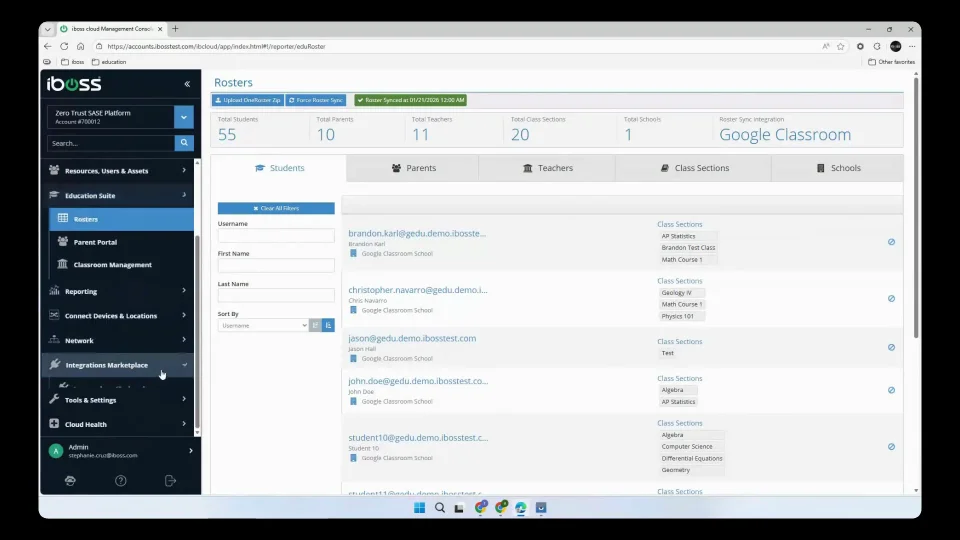
Complete Student Information System Integration
iboss integrates with all major Student Information Systems for seamless roster synchronization and automated classroom management deployment.
PowerSchool
Complete integration with roster sync and automated student enrollment
Google G-Suite
Native integration with Google for Education and Classroom management
ClassLink
SSO integration and automated class assignment management
Other SIS
Compatible with all major Student Information Systems and platforms
K-12 Cybersecurity Leadership Resources
Download essential guides to strengthen your district's cybersecurity posture.
Transform Your Digital Classroom
Give teachers the tools they need to manage technology effectively while keeping students focused and engaged in learning.